
Video Bending Starter Pack
Getting Started with Analog Video Bending
This page was created as a resource for my workshops, Intro to Analog Video Bending and Bending Basics, but I also want it to be useful on it's own. So this page will begin with a bit of context that you can probably skip over if you've attended the workshop.
Also, as a general heads up, any Amazon links are affiliate links. No pressure to use them at all, I mostly just present them as examples.
What is Video Bending?
I generally like to define Circuit Bending as the modification and/or repurposing of electronics with no intent towards engineering, but instead toward artistic experimentation and creation.
Video Bending is the application of these same principles specifically put toward the medium of video. As video equipment that was state of the art in the nineties and early oughts becomes defunct for it’s original purpose, lots of analog video gear has become affordable and can be readily repurposed for video bending.
So while digital video manipulation, or bending with digital video signals is certainly possible, this page will primarily focus on bending analog signals and performing conversions between digital and analog as needed.
This guide will explore the creation and use of a very simple “dirty mixer” rig. This is a fantastic way to learn the principles and practices of video bending, without investing a large amount of money or space. From there as you develop a style and aesthetic, you’ll have a good idea of what gear you might want to add to your rig.
The Dirty Mixer
What is a Dirty Mixer?
A Dirty Mixer is a homebrew device that combines video signals in a chaotic and unpredictable way. Where a professional mixer elegantly transitions between signals, matching frame rates and timing, a dirty mixer just collides the signals into one another. These collisions consist not only of the video itself, but also the encoded signals used for timing and synchronization. These collisions create unique and bizarre glitch effects.
The most common design is attributed to Karl Klomp, so you may also see these referred to as Klomp mixers sometimes.
How do I Get One?
You can either build or buy a dirty mixer. They are very simple devices, so if you have any interest in learning how to circuit bend or work with electronics I highly recommend building one.
You can buy dirty mixers by looking on independent sites, shops, or marketplaces like Etsy. I don’t want to create any bias, so I’ll avoid specific links, but searching terms like “dirty video mixer,” “Klomp Video Mixer,” or “Glitch Video Mixer” will get you plenty of results.
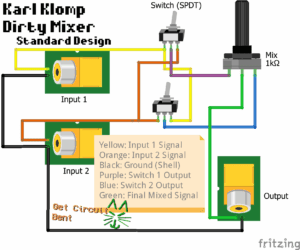
If you want to build a dirty mixer, there are tons of great tutorials on YouTube and other sites, so I won’t rehash too much here. I will share this video, which I like because it is very thorough and should work for anyone, regardless of experience:
If you prefer written instructions, I really like this project as it’s clear and easy to follow:
https://terminalanomaly.dev/DirtyVideoMixer
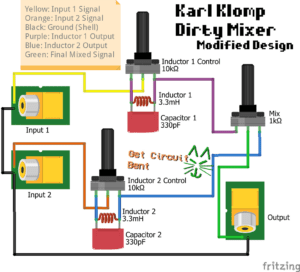
Modified Mixer Design
In my workshop I use a modified version of the “standard” dirty mixer as designed by Karl Klomp. Below are two schematics showing the typical design vs. my modified version. If you aren’t familiar with circuit diagrams, don’t worry; I’ve made these simple to read and you can compare the original design schematic to the tutorials I shared to help wrap your head around it too.
Media and Source Signals
Once you have your mixer, the next thing you’ll need is some video to put into it. Anything with a Composite Video output will work, but here are a few recommendations:
- Physical Media
- VHS tapes and DVDs are perfect for this! If you have an old player you can dust off, break it out! Otherwise its off to the Thrift Store/Garage Sales.
- If you buy one off the internet, be prepared to pay a markup. If you go this route I recommend getting a late model VCR/DVD combo unit with an HDMI output. Since these are easy to use with modern TVs, I think they’re worth the extra cost.
- And of course there’s all kinds of stuff out there, Betamax, Laserdisc, whatever you can find!
- Live Video
- Glitching with a live video feed opens up a lot of options, including creating feedback loops.
- You can use an old camcorder, or even a relatively new one with A/V outputs, or less conventional things like karaoke machines with built-in cameras.
- Older security cameras also work great!
- To create feedback, just point the camera at the TV displaying it’s output and watch the magic happen!
- Digital Sources
- Converters can be a really simple way to play media from a computer in a glitch-able analog format. HDMI and VGA converters work with a ton of devices, and are usually pretty affordable.
- I also really like standalone multimedia players for bringing photos, gifs, and video clips into a piece. They provide a ton of options, and with an extra cable they can be powered by USB too.
- The Prelinger Collection (and Archive.org in general) is a great source for finding footage. I mention this collection specifically as the entire thing is public domain.
Capturing Bent Video
CRT TV
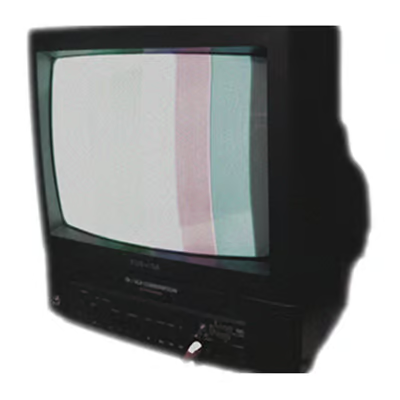
For dirty mixers, there’s really nothing better than a CRT display. Because CRTs are pure analog, all the signal glitches will come through. On digital displays, the signal has to be interpreted first, meaning glitched signals will either get cleaned up, or the display will refuse to read the signal entirely.
Even a small portable CRT works great. When shopping for one, use terms like “old TV” or “tube TV.” Things listed with something like “retro gaming,” or “vintage rare CRT” tend to be marked way up.
Camera Apps
Once your glitches are displaying on your CRT, the best way to capture images is using a camera with control for things like ISO, shutter speed, and frame rate.
If you have a fancy camera you’re good to go! But if not, there are free apps that let you control those parts of a smartphone camera. For taking still images, Adobe’s Project Indigo is excellent. And for video the Blackmagic Camera App is perfect.
And regardless of what you use, a tripod is almost a necessity unless you have incredibly steady hands.
Digital Capture
The easiest way to digitize your glitched video is to use a capture device into a recording software like OBS. Because the capture card has to interpret the glitched signal, it will never capture all your glitches like going to a CRT would.
But I have found that a super cheap capture card does a pretty good job, and is definitely much easier to work with. The idea here is to get the cheapest, crappiest one you can find. The nicer the capture card, the better it will be at cleaning up video signals, and we want our signal as dirty as possible.
Digital Tools
Here are some digital tools that I think are great introductions, and can also be used alongside analog tools to great effect:
- Waaave Pool Dsk is a digital synthesis tool that’s so unique it’s hard to describe, but it’s a really amazing one that can play really well with analog sources. And it’s free!
- OBS is mostly known as an open-source tool for streaming, but its a great tool for video art as well. You can use it to capture pieces or clips, or use it to mix and edit video. It’s an incredibly powerful free tool with a whole community of folks building plugins/effects/etc for video art!
And with that you should have a pretty solid rig that doesn’t cost a boatload! Two sources, a dirty mixer, and a crt or capture card will take you pretty far, but I’ll add some additional projects here you might find interesting as well:
- The VGA Converter Video Synth is a very cool project that let’s you create analog feedback patterns.
- And because a little shameless self promotion never hurt anyone, here’s a project I did for an Audio-Reactive Dirty Mixer: this project uses an Arduino to control a Dirty Mixer based on whatever input you send to the Arduino. I use Audio in this example, but you could use pretty much anything since Arduino is such a beefy platform.
- Here’s an example by artist Jeremy Starn that uses proximity sensors.